PhotoLoop

GPT Image 2.5 Free Online

Turn an idea into a free 1K image with GPT Image 2.5 Sunburst. Generate and preview here without signing up, then refine the prompt before you submit.

One free image per device each day. A free account is required to download.

The free tier supports text-to-image only; no reference image is needed.

ImageGPT Image 2.5 · Free1:1

Your prompt is sent to our model provider to generate the image; free-image downloads are available for 24 hours, storage is cleaned up within about 48 hours, and we never train on it.One free image daily · generating needs no login, downloading needs a free account

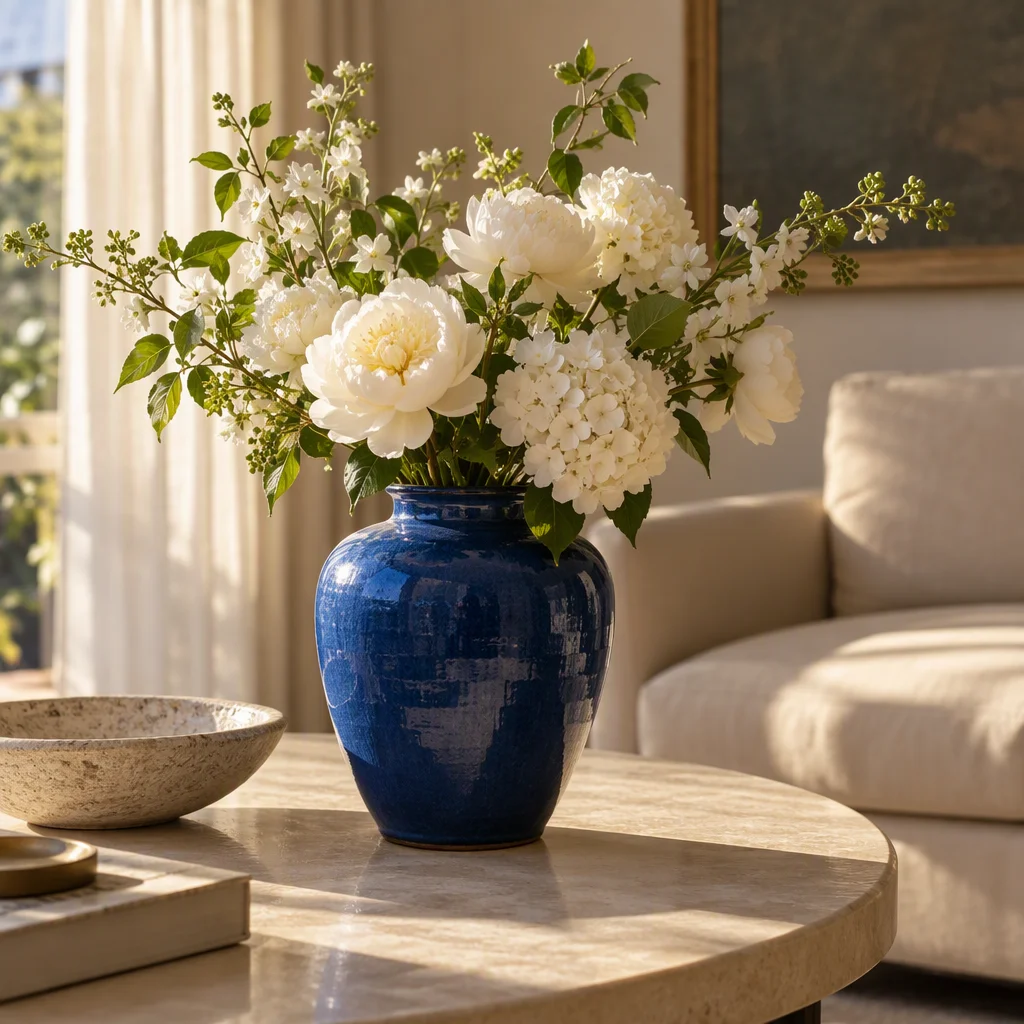
Generated with GPT Image 2.5

Cobalt ceramic vase with white flowers on a cream table in warm afternoon light
A real free Sunburst 1K, 1:1 output. It demonstrates the composition and light from this workflow; it does not promise identical results on every run.

Exact prompt used

A cobalt ceramic vase with white flowers on a cream table, warm afternoon light, editorial photography, no text.

Try this prompt →

Prompt Ideas

Each prompt below can prefill the generator. The link only fills the text; it does not submit automatically. Edit the subject, purpose, and aspect before you generate.

How to Generate a GPT Image 2.5 Image

  1. 01

    Write the scene

    Name the subject and setting, then add light, composition, style, and anything to avoid.

  2. 02

    Choose Free

    Keep GPT Image 2.5 · Free selected, complete the human check, and review the visible settings.

  3. 03

    Preview and download

    Generate and preview anonymously; register or sign in when you want to download, before the access window ends.

How to turn an idea into a clearer image

Name the subject, then its relationships

A useful prompt starts with the subject: a cat, a ceramic vase, a shop, or a product photograph. Then explain how it relates to the setting, such as the vase sitting on a cream table. This gives the model a visual anchor before it interprets space. Avoid opening with unrelated nouns. If there are several subjects, say which one matters most and where each sits in the frame.

Use light and material to set the mood

Light translates more reliably than broad words like premium or beautiful. Try warm afternoon window light, soft overcast daylight, morning mist, or a single table lamp. Material details help too: glazed ceramic can have a controlled highlight, paper can show fine fibers, and glass can have transparent edges. For product work, ask for clean surroundings and soft shadows; for a story scene, allow atmosphere and natural asymmetry.

Make composition something you can inspect

You do not need complex camera jargon, but you should say what must remain in frame. Centered composition suits a single subject and a square portrait; negative space gives room to crop or add your own headline. Ask for a close-up, half-body view, top-down table view, or a subject placed on the left. For 1:1, keep breathing room around the focal point, then check the edges before switching to 16:9 or 9:16.

Add constraints without treating them as guarantees

Phrases such as no text, no logos, and natural proportions can reduce unwanted elements. They are requests, not guarantees: exact lettering, fingers, trademarks, and complex layouts can still fail. If a real person, brand, or commercial asset is involved, check permissions and rights before publishing. Treat important posters and packaging as drafts, then correct copy and marks in a design tool.

Use the free 1K run to test direction

Keep the subject fixed while changing light, background, or camera distance, then choose the closest direction. The free flow is text-to-image at 1K and does not require a reference upload. Available image ratios include 1:1, 16:9, and 9:16; use the settings shown in the generator. Each device gets one free image per day, subject to the human check and remaining daily capacity. Compare changes on later available attempts or review the paid option before submitting.

Know the download, retention, and paid boundaries

After an anonymous generation, you can preview the result. Download access requires an account, lasts 24 hours, and stored content is cleaned up in about 48 hours. The paid GPT Image 2.5 Sunburst option starts at 2 credits per image, with the current charge shown before submission. The page does not promise fixed speed, permanent history, exact text, or identical results; an advanced capability is only available if it appears in the generator.

Troubleshoot one issue at a time

If the subject is cropped, ask for the complete subject in frame with space around it. If the scene is too dark, specify the light direction and shadow softness. For unwanted text or marks, add no text or no logos, then inspect the actual output. Keep your original prompt and change one variable per available attempt. Refreshing repeatedly will not restore a used daily allowance; return when another free attempt is available or review the paid credit cost. Before publishing, check the focal subject, colors, materials, background, lettering, and details.

Use a compact prompt structure

Try this order: subject, setting, light, composition, style, and elements to avoid. Replace the sample's cobalt ceramic vase with a green glass bottle while keeping the cream table and afternoon light to compare materials. For a cover draft, add subject on the right, empty space on the left so you can add a headline yourself. Keep notes on your changes; a focused instruction is easier to compare than a growing list of flattering adjectives.
Good use cases for these images

Product and commerce drafts

Test objects, surfaces, backgrounds, and light before finishing brand copy, pricing, and retouching.

Social graphics

Explore square visuals for posts, thumbnails, or a content calendar while keeping room for your own text.

Editorial and story scenes

Combine a subject, place, weather, and camera distance into a visual reference before writing or planning a shoot.

Composition comparisons

Keep the subject fixed and change only light, material, or aspect ratio to see what moves the focus.

Current free-flow boundaries

The free lane is text-to-image at 1K, with one image per device each day. A human check is required, and shared-network limits or remaining daily capacity can affect availability. You can generate and preview anonymously; downloading requires an account. Download access lasts 24 hours and storage is cleaned up in about 48 hours. Speed, history, exact text, and identical results are not guaranteed.

Explore Image Tools

Try another PhotoLoop image workflow, or return home to choose from the currently available generators.

PhotoLoop is an independent product and is not affiliated with or endorsed by OpenAI. GPT Image is a trademark of OpenAI. This page uses no OpenAI logo.

Frequently Asked Questions

Is GPT Image 2.5 free on PhotoLoop?

Yes. GPT Image 2.5 is available as a free trial with one image per device per day. You can generate and preview without signing up; create an account when you want to download the result.

Can I use GPT Image 2.5 free with no sign-up?

You can submit a text-to-image generation without an account after the required human check. Previewing is available anonymously, while downloading requires registration.

What is GPT Image 2.5 pricing on PhotoLoop?

The GPT Image 2.5 Sunburst paid option starts at 2 credits per image. The generator shows the current credit total before you submit; the free trial is limited to one image per device per day.

Which GPT Image 2.5 version does PhotoLoop provide?

PhotoLoop currently provides the Sunburst variant through a 1K text-to-image free flow. Aspect ratio and paid settings are limited to the verified options shown in the generator.

How long does GPT Image 2.5 take to generate?

Generation time changes with queueing and service conditions. The page does not promise a fixed speed; treat the generator's live wait state as an estimate rather than a guarantee.

Is PhotoLoop the official GPT Image 2.5 service?

No. PhotoLoop is an independent product and is not affiliated with or endorsed by OpenAI. GPT Image is a trademark of OpenAI; this page uses no OpenAI logo.

PHOTOLOOP